Exclusive Resources / Student Loan Repayment Tracker
The Student Loan Repayment Tracker
Put all your student loans in one place, see your debt-free date, find out what extra payments are worth and track your progress against the plan.
Get the free loan tracker
Enter your email and the download unlocks right here, instantly. No password, no credit card. You will also get new LTLM posts and tools. Unsubscribe anytime.
100% freeTakes 5 secondsExcel and Google Sheets
Your loan tracker is ready
You are in. Welcome to Learn to Love Money.
Download the spreadsheet, then follow the steps below. Setting it up takes about 20 minutes.
Download the spreadsheetLTLM-Student-Loan-Repayment-Tracker.xlsx · 297 KB · Free
Using Google Sheets? Here is how →What it is
Student loans usually come as several separate loans, each with its own balance and rate, which makes them confusing to manage. This workbook puts them all in one place and answers the questions that matter: When will I be debt-free? How much interest will I pay? And what is paying extra worth?
Start Here
How it works, the two strategies and the four steps to use it.
Find Your Loans
Exactly where to get each number, starting with StudentAid.gov for federal loans.
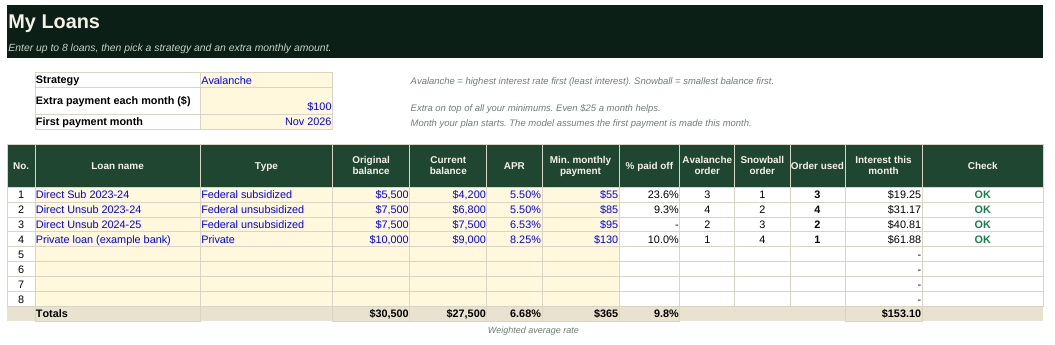
My Loans
Up to 8 loans with balance, rate and minimum payment. Pick avalanche or snowball and an extra monthly amount.
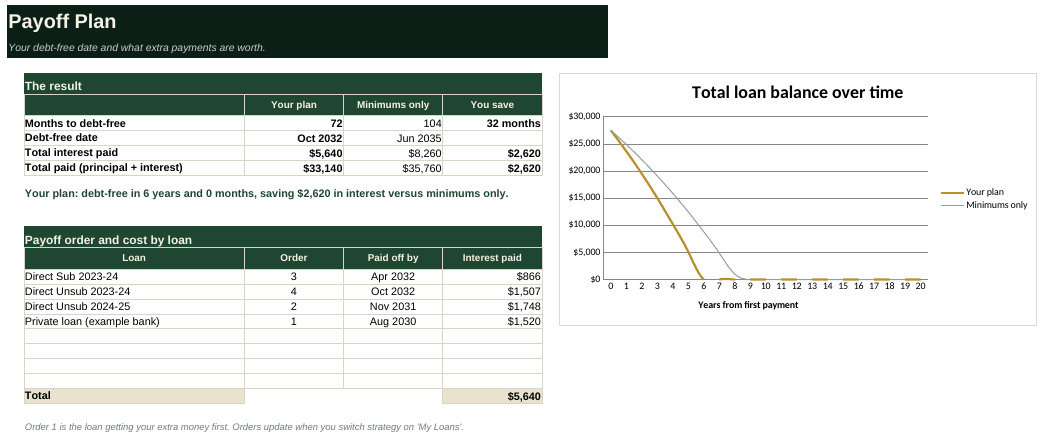
Payoff Plan
Your debt-free date, total interest, payoff order by loan, and savings versus paying only the minimums, with a chart.
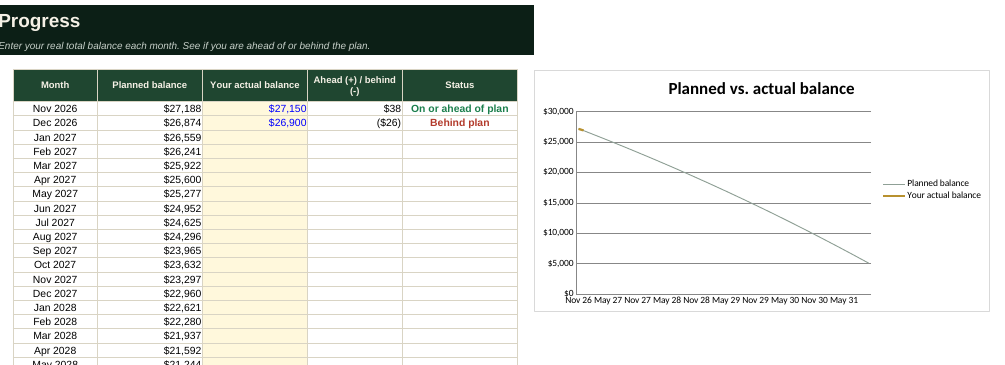
Progress
Enter your real balance each month and see if you are ahead of or behind the plan.
Payment Log
Record every payment. Totals by loan update automatically. Two calculation tabs run the math behind the scenes.
A look inside
These screenshots show the tracker with clearly labeled sample loans. Your copy starts with the same samples so you can see how it works, then you replace them with your own.
Where to find your loan details
Federal loans are all in one place. Private loans take one more step.
| What you need | Where to find it | What to enter |
|---|---|---|
| Loan name and type | StudentAid.gov dashboard, or the lender's website. | 'Direct Subsidized', 'Direct Unsubsidized', 'PLUS' or the private lender's name. Each year and type is usually its own loan. |
| Current balance | Your servicer's website or StudentAid.gov. | Total owed: principal plus any accrued interest. |
| Interest rate (APR) | StudentAid.gov loan details or the servicer site. | The rate for each loan. Federal rates are fixed per loan. Private loans may be variable. |
| Minimum monthly payment | Your servicer's statement or online account. | The amount due each month. If you are still in school, enter what you will owe once repayment starts. |
| Original balance | StudentAid.gov loan details or loan paperwork. | The disbursed amount. Used only to show how far you have come. |
| First payment month | Your servicer account or grace-period end date. | The month your first full payment is due. Typically 6 months after leaving school. |
| Private loans you forgot | A free credit report at annualcreditreport.com. | Private loans do not show on StudentAid.gov. Your credit report lists them with the lender name. |
| Payments you have made | Your servicer's payment history or bank statements. | Dates and amounts, to log on the Payment Log tab. |
Avalanche or snowball?
Both are simple. Pick the one you will stick with.
Highest rate first
Extra money goes to the loan with the highest interest rate. This costs the least interest overall. Best if you are motivated by the math.
Smallest balance first
Extra money goes to the smallest balance. You eliminate whole loans sooner, which can keep you motivated. It may cost slightly more interest.
Everything rolls forward
You keep paying every minimum. When a loan is paid off, its payment joins the extra money and rolls into the next one.
How to use it in 4 steps
Setup takes about 20 minutes. Updating takes a couple of minutes a month.
- Collect your loan details. Use the guide above to get each loan's balance, rate and minimum payment.
- Enter them on My Loans. Delete the sample loans, choose a strategy and type in an extra monthly amount you can afford.
- Read your Payoff Plan. See your debt-free date and how much interest the extra payments save versus minimums only. Try different extra amounts to see what each one is worth.
- Track as you go. Log each payment on the Payment Log and type your real total balance on Progress each month. Ahead of plan? Keep going. Behind? Adjust the plan.
Using Google Sheets
- Download the Excel file, then go to sheets.google.com.
- Choose File → Import → Upload, pick the file, then Replace spreadsheet. Formulas, dropdowns and charts carry over.
Common questions
Is it really free?
Yes. Enter your email, download it and keep it. There is no payment or trial.
Does it work for federal and private loans?
Yes. You can enter both together. Each loan has its own balance, rate and minimum payment.
Does it handle income-driven repayment or forgiveness?
No. This is a simplified fixed-payment model with monthly interest equal to balance times rate divided by 12. Income-driven plans, forgiveness, subsidies, grace periods and interest capitalization are not modeled. Use it for planning and confirm figures with your servicer.
Why does my servicer's number differ slightly?
Servicers calculate interest daily and apply payments on specific dates, so small differences are normal. The plan is a close estimate, not a statement.
How do I make sure extra payments go to the right loan?
Contact your servicer or use their payment tool to specify which loan gets the extra amount. By default some servicers spread extra payments across all loans or treat them as early payments on future bills.
What if my minimum payment is below the monthly interest?
The sheet flags it with a warning. The balance would grow, so check with your servicer or raise the amount.
What if I am still in school?
Enter the current balance including accrued interest, the minimum you expect to owe once repayment starts, and set the first payment month to when that begins.
What if I refinance or consolidate?
Update the loan list with the new balance, rate and payment, and remove the loans that were replaced. Compare refinancing carefully, since refinancing federal loans into a private loan gives up federal protections.
It asks for my email again on another device.
The site remembers you per browser. Enter the same email once on the new device and it unlocks instantly.
Ready to start?
Get the free loan tracker
Enter your email and the download unlocks right here, instantly. No password, no credit card. You will also get new LTLM posts and tools. Unsubscribe anytime.
100% freeTakes 5 secondsExcel and Google Sheets
Your loan tracker is ready
You are in. Welcome to Learn to Love Money.
Download the spreadsheet, then follow the steps below. Setting it up takes about 20 minutes.
Download the spreadsheetLTLM-Student-Loan-Repayment-Tracker.xlsx · 297 KB · Free
Using Google Sheets? Here is how →For educational purposes only. This tracker does not provide personalized financial, tax or legal advice and is a simplified model. Sample loans are made up for illustration. Confirm balances, rates and repayment options with your loan servicer before making decisions.