Exclusive Resources / Investing Starter Tracker
The Investing Starter Tracker
One spreadsheet to set a goal, log what you put in, track what you own and see, in plain numbers, whether you are on track. Built for people who are just starting to invest.
Get the free tracker
Enter your email and the download unlocks right here, instantly. No password, no credit card. You will also get new LTLM posts and tools. Unsubscribe anytime.
100% freeTakes 5 secondsExcel and Google Sheets
Your tracker is ready
You are in. Welcome to Learn to Love Money.
Download the spreadsheet and follow the five steps below. It takes about ten minutes to set up.
Download the trackerLTLM-Investing-Starter-Tracker.xlsx · 59 KB · Free
Using Google Sheets? Here is how →What it is
Most beginners invest for a while and never really know how they are doing. This tracker answers the three questions that matter: Where am I going? What have I put in? What do I own? Every formula is already built. You type in the yellow cells and the rest updates by itself.
My Goal
Set a target, a timeline and a monthly amount. See your projected value, the gap to your goal, the monthly amount you would need, and an on-track or behind status.
Contributions
A simple log of every deposit by date and account (401(k), Roth IRA, brokerage and more). Totals add up automatically.
Holdings
List each fund or stock with shares, cost and current price. It calculates value, gain or loss, share of your portfolio and an allocation chart.
Progress
Enter your balance once a month. A chart compares the money you put in with what your account is worth, so you can see growth separate from saving.
Projection
A 30-year, year-by-year path for your plan. Change the return or monthly amount and watch the curve move.
Start Here
A one-page guide inside the file, with a color key and the same five steps you will find below.
A look inside
These screenshots show the tracker filled with clearly labeled sample data. Your copy starts with the same samples so you can see the format, then you replace them with your own numbers.
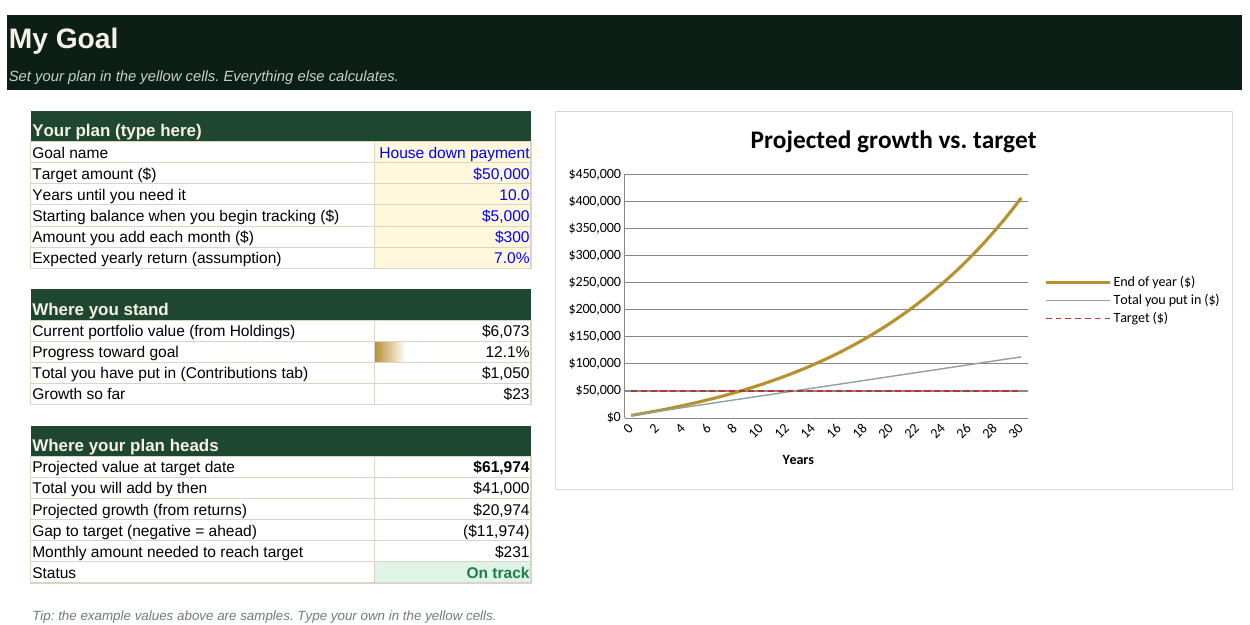
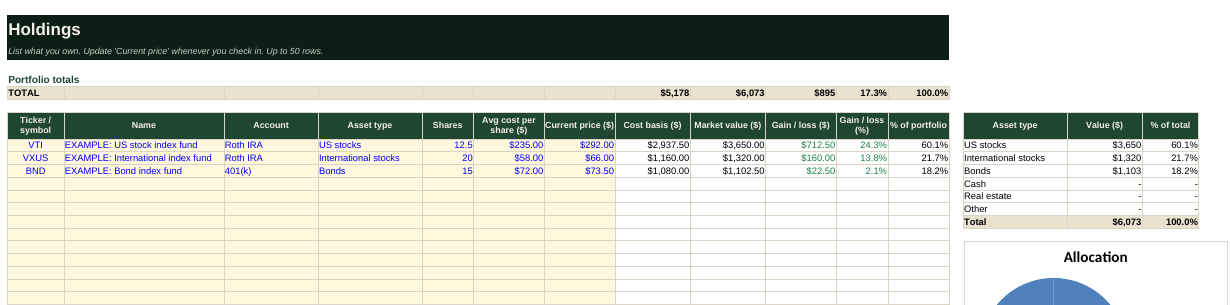
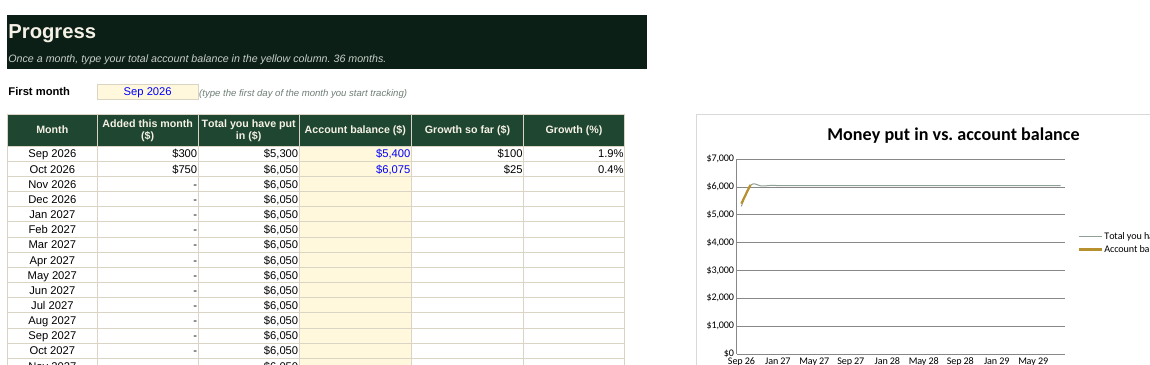
Example tickers are illustrations only, not recommendations.
How to use it in 5 steps
Set it up once, then spend two minutes a month keeping it current.
- Set your goal. Open the My Goal tab. Type a target amount, how many years you have, your starting balance, what you add each month, and an expected yearly return. If you are unsure about the return, try 4%, 7% and 10% to see a range. The tab tells you right away whether you are on track.
- Log your deposits. On Contributions, add a row each time you put money in. Pick the account from the dropdown. Delete the three sample rows first.
- List what you own. On Holdings, enter each fund or stock: ticker, shares, what you paid per share and today's price. Update the price when you check in. Your portfolio value, gains and allocation fill in on their own.
- Check in monthly. On Progress, set your first month once, then type your total account balance at the end of each month. The chart shows money in versus balance.
- Test "what if." On Projection, see your plan year by year. Go back to My Goal and change the monthly amount or return to see what moves the result most.
Using Google Sheets or a phone
Download the Excel file first, then:
- Google Sheets: go to sheets.google.com, choose File → Import → Upload, pick the file, then Replace spreadsheet. All formulas and charts carry over.
- Phone or tablet: open the file in the free Excel app or upload it to Google Drive and open it in Sheets.
Common questions
Is it really free?
Yes. Enter your email, download it and keep it. There is no payment, trial or catch.
Does it connect to my brokerage or bank?
No, and that is on purpose. You type in your own numbers, so your accounts stay private. Nothing you enter in the spreadsheet is sent to us.
Where does the projected growth come from?
From the yearly return you type in. It is an assumption you control, not a forecast or a promise. Real returns vary a lot year to year and can be negative.
Do I have to delete the sample data?
Yes, replace it with yours. Sample rows are labeled "EXAMPLE" so they are easy to spot. Type over the yellow cells and clear the rest.
Can I add more than 50 holdings or 500 deposits?
The formulas cover 50 holdings and 500 contributions, which is plenty for most people. If you need more, copy the last row down and extend the totals.
I came back on another device and it asks for my email again.
The site remembers you per browser. Enter the same email once on the new device and it unlocks instantly.
Ready to start?
Get the free tracker
Enter your email and the download unlocks right here, instantly. No password, no credit card. You will also get new LTLM posts and tools. Unsubscribe anytime.
100% freeTakes 5 secondsExcel and Google Sheets
Your tracker is ready
You are in. Welcome to Learn to Love Money.
Download the spreadsheet and follow the five steps below. It takes about ten minutes to set up.
Download the trackerLTLM-Investing-Starter-Tracker.xlsx · 59 KB · Free
Using Google Sheets? Here is how →For educational purposes only. This tracker does not provide personalized financial, investment, tax or legal advice and is not a recommendation to buy, sell or hold any security. Projections depend on assumptions you enter and are not guarantees. Past performance does not predict future results.