Exclusive Resources / College Student Budget
The College Student Budget
A simple full-year budget built for how college money really works: lumpy income, big semester bills and a tight monthly spend. Plan it, track it and see where it all goes.
Get the free budget
Enter your email and the download unlocks right here, instantly. No password, no credit card. You will also get new LTLM posts and tools. Unsubscribe anytime.
100% freeTakes 5 secondsExcel and Google Sheets
Your budget is ready
You are in. Welcome to Learn to Love Money.
Download the spreadsheet, then follow the steps below. Setting it up takes about 30 minutes.
Download the spreadsheetLTLM-College-Student-Budget.xlsx · 31 KB · Free
Using Google Sheets? Here is how →What it is
College money is different from a regular budget. Income arrives in lumps, big bills hit twice a year, and most of your spending is a handful of categories. This workbook is built for that: plan a normal month, track what actually happens, and plan for the big stuff ahead of time.
Start Here
What the workbook does and the five steps to use it.
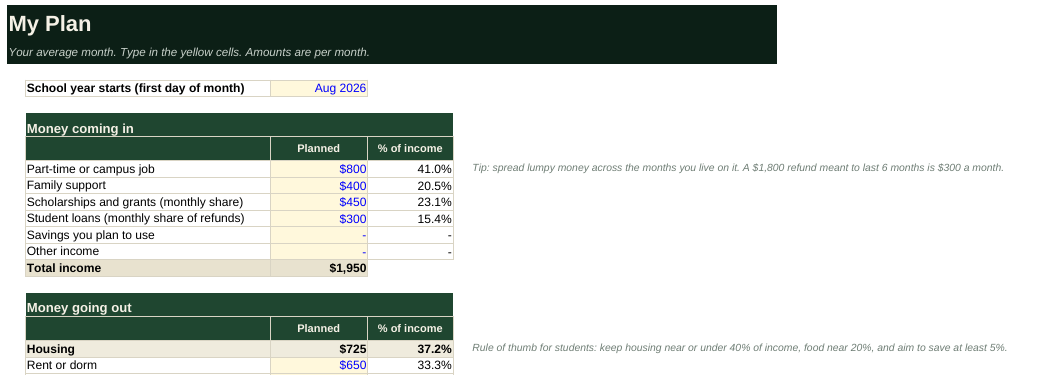
My Plan
Your average month: income by source and spending in 20 student-friendly categories, with percent of income and a clear left-over line.
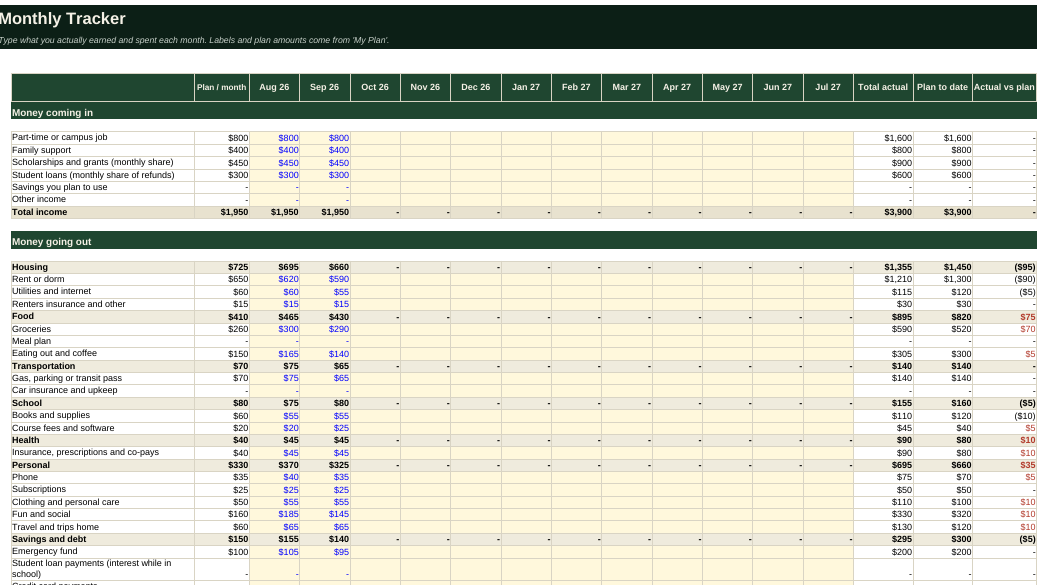
Monthly Tracker
Twelve months side by side. Type what you actually earned and spent and see how each category compares with your plan.
Semester Costs
List your big one-time bills with due dates. It shows what to set aside each month so none of them is a surprise.
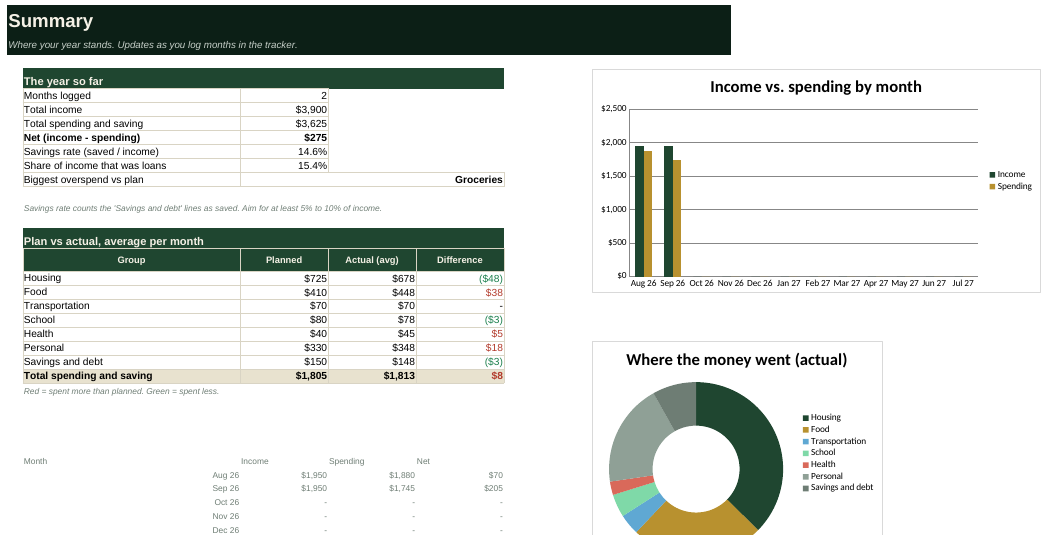
Summary
Savings rate, share of income that came from loans, plan vs actual by group, your biggest overspend and two charts.
Loans shown honestly
Loan refunds count as money coming in, and the Summary shows how much of your year they funded, so borrowing never hides in the numbers.
A look inside
These screenshots show the workbook with clearly labeled sample data for a made-up student. Your copy starts with the same samples so you can see how it works, then you replace them with your own.
Where to find your numbers
You do not need to guess. Most of what you need is already in your bank app, your aid paperwork and your lease. Spend 20 minutes gathering it once, then it is easy.
| What you need | Where to find it | What to enter |
|---|---|---|
| Part-time or campus job | Your pay stubs or the payroll portal, or your bank deposits. | Average take-home pay per month, after taxes. |
| Family support | A quick, honest conversation. | What you can reliably count on each month, not a best case. |
| Scholarships and grants | Your financial aid award letter and student account portal. | The amount left after tuition and fees, divided across the months you live on it. |
| Student loan refunds | Your bursar or student account statement. | The refund amount paid out each semester. Divide by the months it has to cover. |
| Rent, utilities, internet | Your lease and last 2 to 3 bills. | Monthly rent, plus the average of recent utility bills. |
| Groceries and eating out | Your bank or card app's spending-by-category view for the last 2 to 3 months. | Average monthly amounts for each. Most students underestimate eating out. |
| Meal plan | The dining or bursar website. | The semester cost divided by the months it covers, if it is billed separately. |
| Books and supplies | Course syllabi and the campus store or online prices. | The cost per semester divided by the months in it. Rental and used copies save a lot. |
| Phone, subscriptions | Your card statement or app store subscription list. | Every recurring charge. Add them up. They add up fast. |
| Transportation | Parking permit, transit pass or gas receipts. | Monthly average, with big annual costs divided by 12. |
| Big one-time costs | The academic calendar and your bursar bill due dates. | Deposits, flights home and bills due once. Put them on the Semester Costs tab. |
How to use it in 5 steps
Setting it up takes about 30 minutes. Keeping it current takes about 5 minutes a month.
- Gather your numbers. Use the table above. Open your bank app and look at the last 2 to 3 months of spending by category.
- Fill in My Plan. Delete the sample numbers, set the month your school year starts and enter an average month. Make sure the left-over line is zero or positive.
- List big bills on Semester Costs. Add books, deposits and flights with due dates. Add the monthly set-aside to your savings line on My Plan.
- Track each month. At month end, type actual income and spending on the Monthly Tracker. Five minutes is enough.
- Review and adjust. Check the Summary. Move money from over-plan categories, or lower next month's plan where you have wiggle room.
Using Google Sheets
- Download the Excel file, then go to sheets.google.com.
- Choose File → Import → Upload, pick the file, then Replace spreadsheet. Formulas, dropdowns and charts carry over.
Common questions
Is it really free?
Yes. Enter your email, download it and keep it. There is no payment or trial.
Does it connect to my bank?
No, on purpose. You type in your own numbers, so your accounts stay private. Nothing you enter in the spreadsheet is sent to us.
Should student loans count as income?
Loan money is borrowed and must be repaid, so it is not really earnings. The workbook lets you list loan refunds as money coming in so your budget balances in real life, and the Summary shows what share of your year loans funded.
My income is irregular. What do I do?
Use a conservative average in My Plan, and log the real amounts each month on the Tracker. Aim to build a small cushion in good months to cover slow ones.
What about summer?
The tracker covers 12 months. Set your start month to the month your school year begins and fill in summer months with your summer job and costs.
Is there a guideline for how much to spend on each thing?
A common rule of thumb for students is housing near 40% of income or less, food near 20%, and at least 5% saved. These vary a lot by school and city, so treat them as a starting point.
Can I use it if I am not in college?
Yes. The categories are student-friendly, but you can rename them and use the workbook for any budget.
It asks for my email again on another device.
The site remembers you per browser. Enter the same email once on the new device and it unlocks instantly.
Ready to start?
Get the free budget
Enter your email and the download unlocks right here, instantly. No password, no credit card. You will also get new LTLM posts and tools. Unsubscribe anytime.
100% freeTakes 5 secondsExcel and Google Sheets
Your budget is ready
You are in. Welcome to Learn to Love Money.
Download the spreadsheet, then follow the steps below. Setting it up takes about 30 minutes.
Download the spreadsheetLTLM-College-Student-Budget.xlsx · 31 KB · Free
Using Google Sheets? Here is how →For educational purposes only. This budget does not provide personalized financial, investment, tax or legal advice. The sample figures are made up for illustration and are not recommendations.